Tone Generator Guide
By Aaron Shippey | Jul 27, 2025
I recently built a tone generator—my first real dive into making my own JSFX plugin. It’s a fundamental exercise, but it proves the core concept behind all digital sound: simulation.
I recently built a tone generator — my first real dive into making my own JSFX plugin. It’s kind of like a VST, but different — written in REAPER’s built-in scripting language for audio effects.
A tone generator is simple in concept: it’s a type of oscillator. If you’re unfamiliar with that term, just think of something that repeats in cycles — kind of like a pulse or a wave.

Step 1: User Input — Picking a Note (MIDI) First, the user picks a note using a slider. This note is in MIDI format, which is just a number between 0 and 127 — for example, 60 is Middle C, 69 is A4, etc. But MIDI numbers aren’t in Hertz (the unit we use for frequency), so we’ll need to convert that.
Step 2: Convert MIDI to Frequency (Hertz) To turn that MIDI note into a real pitch, we use a simple formula. It says: Take 440 Hz (which is the pitch of A4), and shift it up or down based on how far away the MIDI number is from 69.
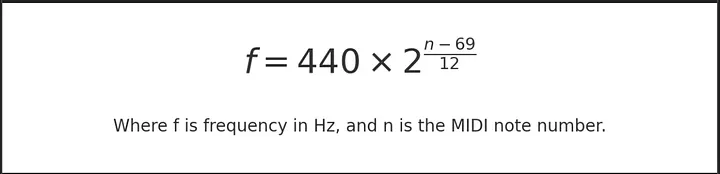
MIDI to Frequency Conversion Formula So for example, if the user selects MIDI note 60 (C4), the formula figures out what pitch that really is — in this case, about 261.63 Hz. That’s the actual speed of vibration we want for our tone.
Step 3: Calculate Rotation Speed (Angular Velocity) Now that we know the frequency, we calculate how fast our waveform should move forward — this is called angular velocity ($\omega$). It just tells us how quickly we spin through a full wave cycle (like a circle).
We calculate it using this formula:
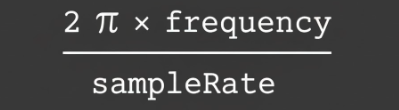
This calculation lets us figure out how much to move forward each time we process a tiny chunk of audio (called a sample). Most systems process about 44,100 samples per second.
Step 4: Keep Track of Where We Are — Phase To know what part of the wave we’re at, we use a variable called phase. Think of it like a pointer moving around a circle.
Every single sample, we move the phase forward just a little bit by adding the angular velocity:
phase += omega; This is kind of like simulating time passing in very small steps — you’re adding a tiny amount every moment, which adds up over time.
Step 5: Create the Sound Finally, we take the current phase and pass it into a sine function:
output = sin(phase); That gives us a smooth wave — and that’s the sound! The faster we spin through the wave (higher frequency), the higher the pitch.
So What’s Really Happening? The user picks a note We figure out how fast that note vibrates We simulate that vibration by looping through samples And we create the wave by calculating points on a circle (a sine wave) It sounds like a lot, but it’s really just a few numbers being added together over and over again — and that’s how digital sound is made!